background img

The New Stuff

Showing posts with label Operating System. Show all posts
This is no significant surprise, Apple is already hard at work on OS X 10.9 (the next major version of its Mac operating system). Signs of OS X 10.9 showing up in web logs were publicised [Google translation] earlier today by Czech site 'Letem svetem Applem', and 9to5Mac confirmed that some of the OS X 10.9 hits are showing up on their own web logs from Apple's corporate network. 

Google Analytics for 9to5Mac
Hits have been identified as coming from Apple's own networks carry a much greater likelihood of being legitimate, and so it seems fairly clear that Apple is using Mac systems running OS X 10.9 to browse the Internet. 

A release date for OS X 10.9 is still unknown, but Apple has been moving at a rapid pace for their development cycle on OS X, with OS X 10.9 Mountain Lion's July launch coming almost exactly one year after the debut of OS X 10.7. Assuming a similar timeline for OS X 10.9, Apple may begin releasing developer previews early 2013 ahead of the public launch event sometime in the middle of the year. 

Signs of OS X 10.9 showing up in web logs

This is no significant surprise, Apple is already hard at work on OS X 10.9 (the next major version of its Mac operating system). Signs of OS X 10.9 showing up in web logs were publicised [Google translation] earlier today by Czech site 'Letem svetem Applem', and 9to5Mac confirmed that some of the OS X 10.9 hits are showing up on their own web logs from Apple's corporate network. 

Google Analytics for 9to5Mac
Hits have been identified as coming from Apple's own networks carry a much greater likelihood of being legitimate, and so it seems fairly clear that Apple is using Mac systems running OS X 10.9 to browse the Internet. 

A release date for OS X 10.9 is still unknown, but Apple has been moving at a rapid pace for their development cycle on OS X, with OS X 10.9 Mountain Lion's July launch coming almost exactly one year after the debut of OS X 10.7. Assuming a similar timeline for OS X 10.9, Apple may begin releasing developer previews early 2013 ahead of the public launch event sometime in the middle of the year. 

It looks like iOS 6.1 is on its way with the first beta arriving to developers. The update is expected to arrive sometime after the holidays with Xcode 4.6 preview for developers to tinker with. The codename for the build is "Build 10B5095f" which has been seen on Apple's official site. 

New tools for making Maps

The most notable new tool is a class called "MKLocalSearch" for the Map Kit framework. It lets programs "search for map-based addresses and points of interest." It lets developers enter placename information and portions of address and have search returns that match the info and provide additional data. 


Example

An example given by Apple was if a user searched for "coffee," the new tool would generate returns with the location of local coffeeshops and provide extra info on each java joint. 

iOS 6.0.1

The release of iOS 6.0.1 which fixed many important bugs that needed to be addressed.
Those hoping that Apple Maps would be fixed during the incremental update should continue to hold their breath. Many users have been upset with the inaccurate and missing data in the navigation app Apple launched during iOS 6 to replace Google Maps

Apple releases iOS 6.1 beta to developers

It looks like iOS 6.1 is on its way with the first beta arriving to developers. The update is expected to arrive sometime after the holidays with Xcode 4.6 preview for developers to tinker with. The codename for the build is "Build 10B5095f" which has been seen on Apple's official site. 

New tools for making Maps

The most notable new tool is a class called "MKLocalSearch" for the Map Kit framework. It lets programs "search for map-based addresses and points of interest." It lets developers enter placename information and portions of address and have search returns that match the info and provide additional data. 


Example

An example given by Apple was if a user searched for "coffee," the new tool would generate returns with the location of local coffeeshops and provide extra info on each java joint. 

iOS 6.0.1

The release of iOS 6.0.1 which fixed many important bugs that needed to be addressed.
Those hoping that Apple Maps would be fixed during the incremental update should continue to hold their breath. Many users have been upset with the inaccurate and missing data in the navigation app Apple launched during iOS 6 to replace Google Maps


Microsoft has just announced the release date for the long-awaited Windows 8. The public can get their copy of Windows 8 on October 26th 2012. Steven Sinosfky made this announcement at Microsoft's annual sales meeting, and the Windows blog quickly shared the news. The launch date applies to both upgrades or installs on a new PC. Microsoft have been hinting an October release date for months now, but now we can official count down until the release.

Source: Microsoft

Windows 8 will be available on October 26th


Microsoft has just announced the release date for the long-awaited Windows 8. The public can get their copy of Windows 8 on October 26th 2012. Steven Sinosfky made this announcement at Microsoft's annual sales meeting, and the Windows blog quickly shared the news. The launch date applies to both upgrades or installs on a new PC. Microsoft have been hinting an October release date for months now, but now we can official count down until the release.

Source: Microsoft

Mozilla Operating System
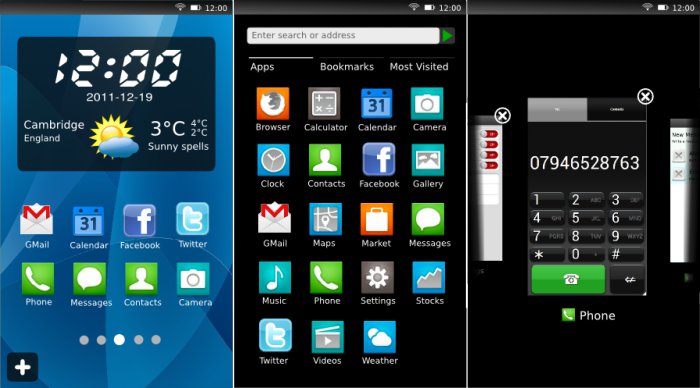
Mobile phones running an operating system developed by makers of the Firefox web browser will go on sale in late 2012.
The first handsets running Mozilla's "Boot to Gecko" (B2G) software will be available in Brazil on Telefonica Vivo's mobile network.
It was announced in July 2011 and plans to challenge Google's Android operating system. B2G was started as a way to bring the same discipline to mobiles and give people more control over what their phones do and the applications they run.
B2G aims to make applications more like web pages to be able to share data and links by basing everything on the new HTML 5. No specific date has been set for release but late 2012 or early 2013 is a high possibly. 

Mozilla Smartphone To Go On Sale In Late 2012

Mozilla Operating System
Mobile phones running an operating system developed by makers of the Firefox web browser will go on sale in late 2012.
The first handsets running Mozilla's "Boot to Gecko" (B2G) software will be available in Brazil on Telefonica Vivo's mobile network.
It was announced in July 2011 and plans to challenge Google's Android operating system. B2G was started as a way to bring the same discipline to mobiles and give people more control over what their phones do and the applications they run.
B2G aims to make applications more like web pages to be able to share data and links by basing everything on the new HTML 5. No specific date has been set for release but late 2012 or early 2013 is a high possibly. 

Microsoft Windows 8 interface
Windows 8 Desktop
Microsoft's next operating system (Windows 8) will only have 3 versions available to purchase compared to the 6 versions available with Windows 7.

Those with an Intel machine will be able to purchase either of two versions: Windows 8 or Windows 8 Pro and those with ARM chips, which are mostly used in tablets can purchase the Windows RT version.

Microsoft has chosen to offer less versions as they believe it will be easier for us in choosing the right version.

The Windows RT version is an attempt from Microsoft to provide Windows 8 on not only your PC but on Smartphones and tablets. Windows RT will sit alongside Apple's iOS and Google's Android Operating Systems.


Find Out More From The Windows Blog

Microsoft Planning To Sell Three Types Of Windows 8

Microsoft Windows 8 interface
Windows 8 Desktop
Microsoft's next operating system (Windows 8) will only have 3 versions available to purchase compared to the 6 versions available with Windows 7.

Those with an Intel machine will be able to purchase either of two versions: Windows 8 or Windows 8 Pro and those with ARM chips, which are mostly used in tablets can purchase the Windows RT version.

Microsoft has chosen to offer less versions as they believe it will be easier for us in choosing the right version.

The Windows RT version is an attempt from Microsoft to provide Windows 8 on not only your PC but on Smartphones and tablets. Windows RT will sit alongside Apple's iOS and Google's Android Operating Systems.


Find Out More From The Windows Blog

Windows 8 loading screen
It has been a few years since Microsoft released the popular Windows 7. And with figures released on the 20th of January 2012 showing that over 525 million licenses of Windows 7 has been sold, people are starting to wonder if Windows 8 will live up to Windows 7's level.
hands-on-windows-8-review
Windows 8 Desktop

I for one has seen Windows 8 and is a bit reluctant to decide if I will upgrade to it or not. Microsoft have decide to change their approach to their products as they have used the same look for most products such as Xbox 360, Nokia Windows 8 Tablet, Nokia Lumia and many more.

Windows 8 Commercial Preview has been released and is completely free to download and try it for yourself just by clicking this link.

Firstly lets take a look at the minimum requirements of your PC to run Windows 8:

  • 1 GHz or faster 32-bit (x86) or 64-bit (x64) processor
  • 1 GB RAM (32-bit) or 2 GB RAM (64-bit)
  • 16 GB available hard disk space (32-bit) or 20 GB (64-bit)
  • DirectX 9 graphics device with WDDM 1.0 or higher driver

Now lets look at 8 new features Microsoft has brought in to Windows 8:


Support For Both PC's and ARM Tablets: Windows 8 is the first Windows edition that will operate on both ARM Tablets and PC's.   


Tile Based User Interface: Although Windows 8 might look like a new design, Microsoft has just created a new user interface on top of a somewhat updated Windows 7. The Windows 8 start menu offers a mosaic look and allows customisation of the home page metro style applications. Windows 8 allows you to view information from applications without actually clicking on them. and still offers the original desktop but without the start menu button. 


Charm Bar: This is a new implementation of the traditional Windows start bar. The Charms Bar can be used to quickly change individual application settings. It is accessed by dragging your mouse to the bottom or top right hand corner of the screen, or pressing the Windows button + C. There are 5 options located in the charm bar, which are Start, Search, Share, Devices and Settings.  


Snap Multi-Tasking: This is designed to allow make it easy to run two or more applications side by side, to re-size them and to switch between them. However Windows 8 does not allow you to view all of your running applications on one page.


Notebook Reviews - Laptop Reviews and Netbook News Picture
Windows 8 Control Panel
New Control Panel: Microsoft has re-designed the control panel by adding new options such as Personalise, Users, Wireless, Notifications, General, Privacy, Search and Share. Personalise allows you to choose what applications you have on your start screen. 


New Web Browser: The new Internet Explorer 10 is built into the new Windows 8 and is designed to offer faster browsing and easier web navigation. 


USB 3.0 Support: Windows 8 offer compatibly for USB 3.0, which offers 10 times more speed than USB 2.0. Microsoft will provide native USB 3.0 drivers something that is not available on Windows 7, however on Windows 7 there are third party drivers for USB 3.0.   


Windows 8 multi-monitor desktopBetter Support For Multiple Monitors: Windows 8 will also bring better support for multiple screens. The preview allowed you to extended the tool bar across two screens, extended the desktop background across two screens and have the start screen on one monitor and the desktop on another without the use of any third party applications.   


I believe Windows 8 will take time to kick off and will take time to get used to as they have changed it dramatically.  


See What Windows 8 Looks Like Here
Find Out More About Windows 8 Here


Windows 8, is it Great?

Windows 8 loading screen
It has been a few years since Microsoft released the popular Windows 7. And with figures released on the 20th of January 2012 showing that over 525 million licenses of Windows 7 has been sold, people are starting to wonder if Windows 8 will live up to Windows 7's level.
hands-on-windows-8-review
Windows 8 Desktop

I for one has seen Windows 8 and is a bit reluctant to decide if I will upgrade to it or not. Microsoft have decide to change their approach to their products as they have used the same look for most products such as Xbox 360, Nokia Windows 8 Tablet, Nokia Lumia and many more.

Windows 8 Commercial Preview has been released and is completely free to download and try it for yourself just by clicking this link.

Firstly lets take a look at the minimum requirements of your PC to run Windows 8:

  • 1 GHz or faster 32-bit (x86) or 64-bit (x64) processor
  • 1 GB RAM (32-bit) or 2 GB RAM (64-bit)
  • 16 GB available hard disk space (32-bit) or 20 GB (64-bit)
  • DirectX 9 graphics device with WDDM 1.0 or higher driver

Now lets look at 8 new features Microsoft has brought in to Windows 8:


Support For Both PC's and ARM Tablets: Windows 8 is the first Windows edition that will operate on both ARM Tablets and PC's.   


Tile Based User Interface: Although Windows 8 might look like a new design, Microsoft has just created a new user interface on top of a somewhat updated Windows 7. The Windows 8 start menu offers a mosaic look and allows customisation of the home page metro style applications. Windows 8 allows you to view information from applications without actually clicking on them. and still offers the original desktop but without the start menu button. 


Charm Bar: This is a new implementation of the traditional Windows start bar. The Charms Bar can be used to quickly change individual application settings. It is accessed by dragging your mouse to the bottom or top right hand corner of the screen, or pressing the Windows button + C. There are 5 options located in the charm bar, which are Start, Search, Share, Devices and Settings.  


Snap Multi-Tasking: This is designed to allow make it easy to run two or more applications side by side, to re-size them and to switch between them. However Windows 8 does not allow you to view all of your running applications on one page.


Notebook Reviews - Laptop Reviews and Netbook News Picture
Windows 8 Control Panel
New Control Panel: Microsoft has re-designed the control panel by adding new options such as Personalise, Users, Wireless, Notifications, General, Privacy, Search and Share. Personalise allows you to choose what applications you have on your start screen. 


New Web Browser: The new Internet Explorer 10 is built into the new Windows 8 and is designed to offer faster browsing and easier web navigation. 


USB 3.0 Support: Windows 8 offer compatibly for USB 3.0, which offers 10 times more speed than USB 2.0. Microsoft will provide native USB 3.0 drivers something that is not available on Windows 7, however on Windows 7 there are third party drivers for USB 3.0.   


Windows 8 multi-monitor desktopBetter Support For Multiple Monitors: Windows 8 will also bring better support for multiple screens. The preview allowed you to extended the tool bar across two screens, extended the desktop background across two screens and have the start screen on one monitor and the desktop on another without the use of any third party applications.   


I believe Windows 8 will take time to kick off and will take time to get used to as they have changed it dramatically.  


See What Windows 8 Looks Like Here
Find Out More About Windows 8 Here


Popular Posts