background img

The New Stuff

Showing posts with label Windows 8. Show all posts
Panasonic is showing off a 20 inch Windows 8 tablet prototype with a 3840 x 2560 pixel display. The tablet weighs in at 5.3 pounds but this product may never be released as a real product, but the demo model on display at the Consumer Electronics Show works pretty well.


So what's inside the tablet? Well it has an Intel Core i5-3427U Ivy Bridge processor, NVIDIA GeForce graphics, 4GB  of memory, and 128GB solid state disk.

It runs Windows 8 Pro, and supports both Metro-style full screen apps and desktop style apps. You would think that with a 4K display the desktop would look ridiculously small, but it turns out that there is a way to fix this problem. All you have to do is set the Windows 8 "change the size of all items" tool to 200 percent, text and graphics look pretty good on the tablet.


But its not all glory with Panasonic's tablet because things start to slow down when you run software that can seriously tax the CPU and GPU cores. For instance, Panasonic is showing off a Blueprint app for creating, viewing, and editing very high resolution images for architects and other designers. It took a really long time for the graphics to fully load in the app.


All the basic tasks like switiching windows, viewing images, and navigating Windows 8 worked well and smooth through the demo.

The prototype measures 18.7" x 13/1" x 0/4", gets about 2 hours of battery life, has a front-facing 720p camera, and features a USB 2.0 port, 802.11b/g/n WiFi, and Bluetooth 4.0.

You can theoretically pick up the tablet and carry it around - but it's clearly just a little too heavy for comfortable one-handed use. This isn't a tablet designed for light reading or web surfing, but it could be great for multi-player gaming, serious artwork (it works wit a digital pen), or other niche activities.

Panasonic's 20 inch, 4K tablet prototype [Video]

Panasonic is showing off a 20 inch Windows 8 tablet prototype with a 3840 x 2560 pixel display. The tablet weighs in at 5.3 pounds but this product may never be released as a real product, but the demo model on display at the Consumer Electronics Show works pretty well.


So what's inside the tablet? Well it has an Intel Core i5-3427U Ivy Bridge processor, NVIDIA GeForce graphics, 4GB  of memory, and 128GB solid state disk.

It runs Windows 8 Pro, and supports both Metro-style full screen apps and desktop style apps. You would think that with a 4K display the desktop would look ridiculously small, but it turns out that there is a way to fix this problem. All you have to do is set the Windows 8 "change the size of all items" tool to 200 percent, text and graphics look pretty good on the tablet.


But its not all glory with Panasonic's tablet because things start to slow down when you run software that can seriously tax the CPU and GPU cores. For instance, Panasonic is showing off a Blueprint app for creating, viewing, and editing very high resolution images for architects and other designers. It took a really long time for the graphics to fully load in the app.


All the basic tasks like switiching windows, viewing images, and navigating Windows 8 worked well and smooth through the demo.

The prototype measures 18.7" x 13/1" x 0/4", gets about 2 hours of battery life, has a front-facing 720p camera, and features a USB 2.0 port, 802.11b/g/n WiFi, and Bluetooth 4.0.

You can theoretically pick up the tablet and carry it around - but it's clearly just a little too heavy for comfortable one-handed use. This isn't a tablet designed for light reading or web surfing, but it could be great for multi-player gaming, serious artwork (it works wit a digital pen), or other niche activities.


Earlier this week the monster company Microsoft announced that there will be certain third party stores around the world would be selling the Microsoft Surface tablet before Christmas. A couple of US and Australian chain stores that would stock the Surface "as soon as mid-December" but we guessed that UK would be included in the following catchall statement: "additional availability will be added in a number of countries in the coming months." However, we have received information from one of our staff at John Lewis that the Microsoft Surface is now available in John Lewis stores.


Two year guarantee at no extra cost!

John Lewis informed Pocket Lint that:
"Always first with the latest technology, John Lewis is delighted to announce that it will be the first high street retailer in the UK to offer the Microsoft Surface from the 14 December 2012 and with a two-year guarantee included at no extra cost."
The company said that the Surface will be available online today and starting from Saturday you will be able to buy one in store. This weekend will be the first opportunity for any UK residents to see the Microsoft Surface in person.


John Lewis will be offering two Microsoft Surface packages. You will be able to choose from either the Microsoft Surface 32GB with Black Touch Keyboard at £479 or the Microsoft Surface 64GB with Black Touch Keyboard at £559, both with the amazing two-year guarantee. You can also get the Microsoft Keyboard alone for £100.


Microsoft Surface available at John Lewis Starting From Today!

Earlier this week the monster company Microsoft announced that there will be certain third party stores around the world would be selling the Microsoft Surface tablet before Christmas. A couple of US and Australian chain stores that would stock the Surface "as soon as mid-December" but we guessed that UK would be included in the following catchall statement: "additional availability will be added in a number of countries in the coming months." However, we have received information from one of our staff at John Lewis that the Microsoft Surface is now available in John Lewis stores.


Two year guarantee at no extra cost!

John Lewis informed Pocket Lint that:
"Always first with the latest technology, John Lewis is delighted to announce that it will be the first high street retailer in the UK to offer the Microsoft Surface from the 14 December 2012 and with a two-year guarantee included at no extra cost."
The company said that the Surface will be available online today and starting from Saturday you will be able to buy one in store. This weekend will be the first opportunity for any UK residents to see the Microsoft Surface in person.


John Lewis will be offering two Microsoft Surface packages. You will be able to choose from either the Microsoft Surface 32GB with Black Touch Keyboard at £479 or the Microsoft Surface 64GB with Black Touch Keyboard at £559, both with the amazing two-year guarantee. You can also get the Microsoft Keyboard alone for £100.


Some of you may not know who Steven Sinofsky is, but he is, well was the Windows division leader, or chief in command  for Windows if you wish to call it. News came out earlier today that he has left the Organisation with immediate effect. No information has been released on how or why he left, but it will come as a shock to most people considering that the new 'flagship' operation system, Windows 8, was only released just weeks ago. Microsoft said the Julie Larson-Green will be replacing him in the role and becoming the lead role in hardware and software engineering.


However sources suggest that it could be due to an internal conflict between him and the chief executive, Steve Ballmer, but this could be true or false so its not really information to stick to however the shock of him leaving will have an effect on Microsoft, whether its good or bad we will not know until the future months to come.


could this be the slowing end for Microsoft? Could this be the change that Microsoft needs to really step up their game to stay on top? There is only one way to find out, see you in months to come.

Steven Sinofsky has Left the Building!

Some of you may not know who Steven Sinofsky is, but he is, well was the Windows division leader, or chief in command  for Windows if you wish to call it. News came out earlier today that he has left the Organisation with immediate effect. No information has been released on how or why he left, but it will come as a shock to most people considering that the new 'flagship' operation system, Windows 8, was only released just weeks ago. Microsoft said the Julie Larson-Green will be replacing him in the role and becoming the lead role in hardware and software engineering.


However sources suggest that it could be due to an internal conflict between him and the chief executive, Steve Ballmer, but this could be true or false so its not really information to stick to however the shock of him leaving will have an effect on Microsoft, whether its good or bad we will not know until the future months to come.


could this be the slowing end for Microsoft? Could this be the change that Microsoft needs to really step up their game to stay on top? There is only one way to find out, see you in months to come.


Microsoft has been hinting the new Skype app for the recent release Windows 8 Phone. It is all now becoming reality because Microsoft has now released a preview of the new Skype application for the all new Windows 8 Phone.

According to Microsoft, there are a bunch of new features that inclue the app running in the background, incoming calls that match the style of regular phone conversations, and lock screen notifications.

To get the app, all you have to do is search for it in the Windows Store; or WPcentral says you should be able to download it by following this link. If you want to know more about the app's features and improvements, you can watch the video below.

Skype for Windows 8 Phone Preview


Microsoft has been hinting the new Skype app for the recent release Windows 8 Phone. It is all now becoming reality because Microsoft has now released a preview of the new Skype application for the all new Windows 8 Phone.

According to Microsoft, there are a bunch of new features that inclue the app running in the background, incoming calls that match the style of regular phone conversations, and lock screen notifications.

To get the app, all you have to do is search for it in the Windows Store; or WPcentral says you should be able to download it by following this link. If you want to know more about the app's features and improvements, you can watch the video below.


Today Xbox have released a new update for the Xbox 360 dashboard, this occurs yearly, and to be perfectly honest I wasn't expecting any dramatic over hauls of what they currently have, but there have been a few significant tweaks to the dashboard.
Well this is it! The new dashboard, obviously it does look better when there is a premium theme as the background, but the actual dashboard is the main focus. As you can probably see, this layout is almost identical to Microsoft's brand new operating system 'Windows 8'. I knew for a fact that there would be some similarities between the two of them, but I did not think that they would look this much alike! Although I approve of the new Xbox dashboard, I feel that they could have really gone out on a limb and made it something special, something to appeal to more customers, and increase their sales, as good as it is, it doesn't look like Microsoft have used maximum effort in designing this operating system.
'Windows 8'
There are a few new features on the dashboard (all be it small ones). The most significant one, I think is  the introduction of Internet explorer, which is extremely useful and I really am quite fond of this idea. I felt that the Xbox has always been lacking in the web browser department, the reason being that the Playstation 3 had one, and the 360 did not. Now that has changed I feel that the Xbox's browser 1-up's the PS3's. The reason being that Internet Explorer has been around for quite some time, and Microsoft have had the time to enhance it, and listen to the constructive criticisms of their customers. Whilst PS3 have made a browser specifically for Playstation (PS3, PSVita, PSP), which is an advantage, but I think it is more of a disadvantage. This is because Internet Explorer is used for both computers, and the Xbox, (although some adjustments had to be made to allow it to run on xbox) and this means that Microsoft will have previous experiences with fixing their browser, ensuring that it is as safe as possible, so if any problems are found with the Xbox Internet Explorer, they will be able to fix them with ease.


Xbox 360 October 16th Update

Today Xbox have released a new update for the Xbox 360 dashboard, this occurs yearly, and to be perfectly honest I wasn't expecting any dramatic over hauls of what they currently have, but there have been a few significant tweaks to the dashboard.
Well this is it! The new dashboard, obviously it does look better when there is a premium theme as the background, but the actual dashboard is the main focus. As you can probably see, this layout is almost identical to Microsoft's brand new operating system 'Windows 8'. I knew for a fact that there would be some similarities between the two of them, but I did not think that they would look this much alike! Although I approve of the new Xbox dashboard, I feel that they could have really gone out on a limb and made it something special, something to appeal to more customers, and increase their sales, as good as it is, it doesn't look like Microsoft have used maximum effort in designing this operating system.
'Windows 8'
There are a few new features on the dashboard (all be it small ones). The most significant one, I think is  the introduction of Internet explorer, which is extremely useful and I really am quite fond of this idea. I felt that the Xbox has always been lacking in the web browser department, the reason being that the Playstation 3 had one, and the 360 did not. Now that has changed I feel that the Xbox's browser 1-up's the PS3's. The reason being that Internet Explorer has been around for quite some time, and Microsoft have had the time to enhance it, and listen to the constructive criticisms of their customers. Whilst PS3 have made a browser specifically for Playstation (PS3, PSVita, PSP), which is an advantage, but I think it is more of a disadvantage. This is because Internet Explorer is used for both computers, and the Xbox, (although some adjustments had to be made to allow it to run on xbox) and this means that Microsoft will have previous experiences with fixing their browser, ensuring that it is as safe as possible, so if any problems are found with the Xbox Internet Explorer, they will be able to fix them with ease.


So far, Microsoft have been slowly adding customisation features into Windows 8 throughout there major preview releases, but the final Release will include 20 Start Screen patterns. From the leaked screenshot, it is hard to make out if this is real or fake, and some patterns look a bit more complex compared to the other the five existing patterns that have shipped in the Preview copies of Windows 8 - suggesting that the customisation options will quickly change the look of the Start Screen for some. Win8china posted a new lock screen image today, which includes a render of Seattle's space needle. Microsoft is expected to announce the Release to Manufacturing (RTM) of Windows 8 this week.


Source: Win8China

20 new Windows 8 Start Screen patterns in final build


So far, Microsoft have been slowly adding customisation features into Windows 8 throughout there major preview releases, but the final Release will include 20 Start Screen patterns. From the leaked screenshot, it is hard to make out if this is real or fake, and some patterns look a bit more complex compared to the other the five existing patterns that have shipped in the Preview copies of Windows 8 - suggesting that the customisation options will quickly change the look of the Start Screen for some. Win8china posted a new lock screen image today, which includes a render of Seattle's space needle. Microsoft is expected to announce the Release to Manufacturing (RTM) of Windows 8 this week.


Source: Win8China


Earlier this year, Microsoft revealed its new Touch Mouse. Microsoft is now planning to add support to Windows 8 for its existing Touch Mouse. THe company is detailing the exact gestures this week. 

The new support, that will arrive when Windows 8 ships to the public, will include a one finger swipe to scroll up and down in documents, a two finger movement to manage apps and display the Windows 8 charms, a three finger movement to zoom in and out and a thumb gesture to navigate forwards and backwards though apps. 

Microsoft says that the updated gestures will "help make navigating through Windows 8 a breeze." Microsoft is not detailing when this support will be made available in driver form, but it appears updated drivers will be available once Windows 8 is released this fall. 


Microsoft announces upcoming gestures for its Touch Mouse


Earlier this year, Microsoft revealed its new Touch Mouse. Microsoft is now planning to add support to Windows 8 for its existing Touch Mouse. THe company is detailing the exact gestures this week. 

The new support, that will arrive when Windows 8 ships to the public, will include a one finger swipe to scroll up and down in documents, a two finger movement to manage apps and display the Windows 8 charms, a three finger movement to zoom in and out and a thumb gesture to navigate forwards and backwards though apps. 

Microsoft says that the updated gestures will "help make navigating through Windows 8 a breeze." Microsoft is not detailing when this support will be made available in driver form, but it appears updated drivers will be available once Windows 8 is released this fall. 


Microsoft has just announced the release date for the long-awaited Windows 8. The public can get their copy of Windows 8 on October 26th 2012. Steven Sinosfky made this announcement at Microsoft's annual sales meeting, and the Windows blog quickly shared the news. The launch date applies to both upgrades or installs on a new PC. Microsoft have been hinting an October release date for months now, but now we can official count down until the release.

Source: Microsoft

Windows 8 will be available on October 26th


Microsoft has just announced the release date for the long-awaited Windows 8. The public can get their copy of Windows 8 on October 26th 2012. Steven Sinosfky made this announcement at Microsoft's annual sales meeting, and the Windows blog quickly shared the news. The launch date applies to both upgrades or installs on a new PC. Microsoft have been hinting an October release date for months now, but now we can official count down until the release.

Source: Microsoft

Microsoft is "reimagining" their Windows 8 operating system and the company brand may also be expanding to its own line of keyboards. Reports claim that there have been images floating around the web of a Wedge Mobile keyboard, complete with the redesigned Windows logo. The Wedge Mobile keyboard looks to be a small keyboard, designed for mobile use, maybe for their newly released Surface tablet, and appears to include some type of cover as well.
The Wedge keyboard will debut "very soon" according to WinMag and will be sold together with Windows 8. Microsoft previously revealed that its hardware partners will start to use the new Windows logo on PCs and phones later this year, with the company's new Surface device also having it as well.

We will update you when new reports come in. 

Source: WinMag


Microsoft preparing a new line of 'Wedge' Windows 8 keyboards

Microsoft is "reimagining" their Windows 8 operating system and the company brand may also be expanding to its own line of keyboards. Reports claim that there have been images floating around the web of a Wedge Mobile keyboard, complete with the redesigned Windows logo. The Wedge Mobile keyboard looks to be a small keyboard, designed for mobile use, maybe for their newly released Surface tablet, and appears to include some type of cover as well.
The Wedge keyboard will debut "very soon" according to WinMag and will be sold together with Windows 8. Microsoft previously revealed that its hardware partners will start to use the new Windows logo on PCs and phones later this year, with the company's new Surface device also having it as well.

We will update you when new reports come in. 

Source: WinMag


Today Microsoft's Tami Reller announced that Windows 8 will Release to Manufacturing (RTM) in the first week in August, with a public release date in late October to retail stores. Reller also revealed at the Worldwide Partner Conference in Canada that the company is "on track" to finishing the final copy of Windows 8 in early August.

Microsoft revealed in late May that an RTM announcement was due "within two months," and also an early August date should be coming to be in line with the company's initial expectations. Microsoft recently has been compiling final versions of Windows 8, which include new features and the removal of Microsoft' Aero Glass UI in desktop mode.


Windows 8 launching late October, RTM 'on track' for August


Today Microsoft's Tami Reller announced that Windows 8 will Release to Manufacturing (RTM) in the first week in August, with a public release date in late October to retail stores. Reller also revealed at the Worldwide Partner Conference in Canada that the company is "on track" to finishing the final copy of Windows 8 in early August.

Microsoft revealed in late May that an RTM announcement was due "within two months," and also an early August date should be coming to be in line with the company's initial expectations. Microsoft recently has been compiling final versions of Windows 8, which include new features and the removal of Microsoft' Aero Glass UI in desktop mode.


Today, Microsoft has announced that the Windows 8 Pro upgrade will be $39.99. Windows fans may not be pleased to hear that the software update is going to be more expensive than OS X Mountain Lion.

Windows 8 Pro will be available across 131 markets and Microsoft also adds that your $40 will give you the ability to "add Windows Media Center for FREE through the 'Add features' section within the Windows 8 Pro," after you upgrade.

Upgrade to Windows 8 Pro Will Cost More Than OS X Mountain Lion

Today, Microsoft has announced that the Windows 8 Pro upgrade will be $39.99. Windows fans may not be pleased to hear that the software update is going to be more expensive than OS X Mountain Lion.

Windows 8 Pro will be available across 131 markets and Microsoft also adds that your $40 will give you the ability to "add Windows Media Center for FREE through the 'Add features' section within the Windows 8 Pro," after you upgrade.

If you missed the Microsoft's annual Windows Phone Developer Summit, then you are in luck! Microsoft this afternoon uploaded the entire event as a repayable video.


You can also watch it on Channel9 to watch this years Windows Phone Developer Summit in full. You will need Microsoft's Siverlight plugin installed in order to replay the 2-hour-long keynote.

Click [here] to watch the Keynote

Did You Miss Microsoft's Windows Phone 8 Keynote?

If you missed the Microsoft's annual Windows Phone Developer Summit, then you are in luck! Microsoft this afternoon uploaded the entire event as a repayable video.


You can also watch it on Channel9 to watch this years Windows Phone Developer Summit in full. You will need Microsoft's Siverlight plugin installed in order to replay the 2-hour-long keynote.

Click [here] to watch the Keynote


Google Chrome will be available in Metro-style UI for Windows 8, very soon. Google has already started working on this version in early March. This version of Chrome is supposed to work on both Metro and desktop environments for Windows 8 in x86.

However, Google Confirmed that Chome will not run in WinRT, which is Windows 8 on ARM, since Microsoft is not allowing any browsers other than Internet Explorer 10 in that platform.

If you’re running the Release Preview of Windows 8, you’ll be able to try Chrome in Metro mode in the next Chrome Dev channel release by setting it as your default browser. The initial releases of Chrome in Metro mode will include integration with the basic Windows 8 system functionality, such as charms and snap view.

You will be able to install Chrome (Metro) for Windows 8 Release Preview very soon!

Google Chrome Metro Style for Windows 8


Google Chrome will be available in Metro-style UI for Windows 8, very soon. Google has already started working on this version in early March. This version of Chrome is supposed to work on both Metro and desktop environments for Windows 8 in x86.

However, Google Confirmed that Chome will not run in WinRT, which is Windows 8 on ARM, since Microsoft is not allowing any browsers other than Internet Explorer 10 in that platform.

If you’re running the Release Preview of Windows 8, you’ll be able to try Chrome in Metro mode in the next Chrome Dev channel release by setting it as your default browser. The initial releases of Chrome in Metro mode will include integration with the basic Windows 8 system functionality, such as charms and snap view.

You will be able to install Chrome (Metro) for Windows 8 Release Preview very soon!


Calling all Windows 8 fans, thanks to a blog post from Microsoft's Corporate Vice President of Windows Development, Chuck Chan. The Windows "Release Preview" version of Windows 8 is supposed to be available some time today, May 31.

Or at least it was... The entry was only up for about two minutes before it was pulled down from the new Windows 8 Hardware and Driver Developer Blog, which Microsoft will officially launch with the release preview. The blog is meant to provide the insights and best practices for developers looking to build hardware and drivers for Windows 8. 

The post was in good time because an announcement Microsoft made last April, indicating that the Release Preview launch would take place in the "first week" of june. 

This version of Windows will not be feature complete, but it will be the best indication so far of how Windows 8 will look and feel when it is finally released later this year. At the moment there is no current release date of Windows 8 or a pricing scheme. But we know that there will be four versions of the new Operating System, Windows 8, Windows 8 Pro (for hardware based on x86), Windows RT (for hardware based on ARM), and Windows 8 Enterprise.


Windows 8 Release Preview: Any Minute Now...


Calling all Windows 8 fans, thanks to a blog post from Microsoft's Corporate Vice President of Windows Development, Chuck Chan. The Windows "Release Preview" version of Windows 8 is supposed to be available some time today, May 31.

Or at least it was... The entry was only up for about two minutes before it was pulled down from the new Windows 8 Hardware and Driver Developer Blog, which Microsoft will officially launch with the release preview. The blog is meant to provide the insights and best practices for developers looking to build hardware and drivers for Windows 8. 

The post was in good time because an announcement Microsoft made last April, indicating that the Release Preview launch would take place in the "first week" of june. 

This version of Windows will not be feature complete, but it will be the best indication so far of how Windows 8 will look and feel when it is finally released later this year. At the moment there is no current release date of Windows 8 or a pricing scheme. But we know that there will be four versions of the new Operating System, Windows 8, Windows 8 Pro (for hardware based on x86), Windows RT (for hardware based on ARM), and Windows 8 Enterprise.


Microsoft's $15 Windows 8 Pro upgrade offer will run from June 2nd to January 31st, 2013, according to one source familiar with the company's plans. 

Microsoft Store customers who purchase a Windows 7 PC from june 2nd will be offered a Windows 8 Pro upgrade for only $14.99. Also, Microsoft Store customers who participate in the Windows 8 Pro Upgrade offer will also be invited to exclusive workshops to learn more about Windows 8. Microsoft will also supply a $20 Microsoft Store gift card for a present for attending one of its planned workshops. 

Microsoft's $15 Windows 8 upgrade offer!


Microsoft's $15 Windows 8 Pro upgrade offer will run from June 2nd to January 31st, 2013, according to one source familiar with the company's plans. 

Microsoft Store customers who purchase a Windows 7 PC from june 2nd will be offered a Windows 8 Pro upgrade for only $14.99. Also, Microsoft Store customers who participate in the Windows 8 Pro Upgrade offer will also be invited to exclusive workshops to learn more about Windows 8. Microsoft will also supply a $20 Microsoft Store gift card for a present for attending one of its planned workshops. 

Microsoft Windows 8 interface
Windows 8 Desktop
Microsoft's next operating system (Windows 8) will only have 3 versions available to purchase compared to the 6 versions available with Windows 7.

Those with an Intel machine will be able to purchase either of two versions: Windows 8 or Windows 8 Pro and those with ARM chips, which are mostly used in tablets can purchase the Windows RT version.

Microsoft has chosen to offer less versions as they believe it will be easier for us in choosing the right version.

The Windows RT version is an attempt from Microsoft to provide Windows 8 on not only your PC but on Smartphones and tablets. Windows RT will sit alongside Apple's iOS and Google's Android Operating Systems.


Find Out More From The Windows Blog

Microsoft Planning To Sell Three Types Of Windows 8

Microsoft Windows 8 interface
Windows 8 Desktop
Microsoft's next operating system (Windows 8) will only have 3 versions available to purchase compared to the 6 versions available with Windows 7.

Those with an Intel machine will be able to purchase either of two versions: Windows 8 or Windows 8 Pro and those with ARM chips, which are mostly used in tablets can purchase the Windows RT version.

Microsoft has chosen to offer less versions as they believe it will be easier for us in choosing the right version.

The Windows RT version is an attempt from Microsoft to provide Windows 8 on not only your PC but on Smartphones and tablets. Windows RT will sit alongside Apple's iOS and Google's Android Operating Systems.


Find Out More From The Windows Blog

Windows 8 loading screen
It has been a few years since Microsoft released the popular Windows 7. And with figures released on the 20th of January 2012 showing that over 525 million licenses of Windows 7 has been sold, people are starting to wonder if Windows 8 will live up to Windows 7's level.
hands-on-windows-8-review
Windows 8 Desktop

I for one has seen Windows 8 and is a bit reluctant to decide if I will upgrade to it or not. Microsoft have decide to change their approach to their products as they have used the same look for most products such as Xbox 360, Nokia Windows 8 Tablet, Nokia Lumia and many more.

Windows 8 Commercial Preview has been released and is completely free to download and try it for yourself just by clicking this link.

Firstly lets take a look at the minimum requirements of your PC to run Windows 8:

  • 1 GHz or faster 32-bit (x86) or 64-bit (x64) processor
  • 1 GB RAM (32-bit) or 2 GB RAM (64-bit)
  • 16 GB available hard disk space (32-bit) or 20 GB (64-bit)
  • DirectX 9 graphics device with WDDM 1.0 or higher driver

Now lets look at 8 new features Microsoft has brought in to Windows 8:


Support For Both PC's and ARM Tablets: Windows 8 is the first Windows edition that will operate on both ARM Tablets and PC's.   


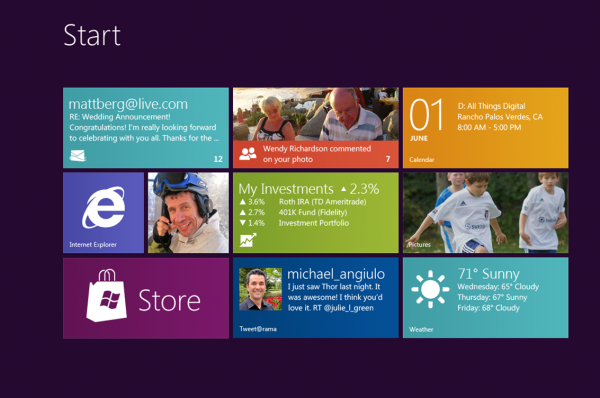
Tile Based User Interface: Although Windows 8 might look like a new design, Microsoft has just created a new user interface on top of a somewhat updated Windows 7. The Windows 8 start menu offers a mosaic look and allows customisation of the home page metro style applications. Windows 8 allows you to view information from applications without actually clicking on them. and still offers the original desktop but without the start menu button. 


Charm Bar: This is a new implementation of the traditional Windows start bar. The Charms Bar can be used to quickly change individual application settings. It is accessed by dragging your mouse to the bottom or top right hand corner of the screen, or pressing the Windows button + C. There are 5 options located in the charm bar, which are Start, Search, Share, Devices and Settings.  


Snap Multi-Tasking: This is designed to allow make it easy to run two or more applications side by side, to re-size them and to switch between them. However Windows 8 does not allow you to view all of your running applications on one page.


Notebook Reviews - Laptop Reviews and Netbook News Picture
Windows 8 Control Panel
New Control Panel: Microsoft has re-designed the control panel by adding new options such as Personalise, Users, Wireless, Notifications, General, Privacy, Search and Share. Personalise allows you to choose what applications you have on your start screen. 


New Web Browser: The new Internet Explorer 10 is built into the new Windows 8 and is designed to offer faster browsing and easier web navigation. 


USB 3.0 Support: Windows 8 offer compatibly for USB 3.0, which offers 10 times more speed than USB 2.0. Microsoft will provide native USB 3.0 drivers something that is not available on Windows 7, however on Windows 7 there are third party drivers for USB 3.0.   


Windows 8 multi-monitor desktopBetter Support For Multiple Monitors: Windows 8 will also bring better support for multiple screens. The preview allowed you to extended the tool bar across two screens, extended the desktop background across two screens and have the start screen on one monitor and the desktop on another without the use of any third party applications.   


I believe Windows 8 will take time to kick off and will take time to get used to as they have changed it dramatically.  


See What Windows 8 Looks Like Here
Find Out More About Windows 8 Here


Windows 8, is it Great?

Windows 8 loading screen
It has been a few years since Microsoft released the popular Windows 7. And with figures released on the 20th of January 2012 showing that over 525 million licenses of Windows 7 has been sold, people are starting to wonder if Windows 8 will live up to Windows 7's level.
hands-on-windows-8-review
Windows 8 Desktop

I for one has seen Windows 8 and is a bit reluctant to decide if I will upgrade to it or not. Microsoft have decide to change their approach to their products as they have used the same look for most products such as Xbox 360, Nokia Windows 8 Tablet, Nokia Lumia and many more.

Windows 8 Commercial Preview has been released and is completely free to download and try it for yourself just by clicking this link.

Firstly lets take a look at the minimum requirements of your PC to run Windows 8:

  • 1 GHz or faster 32-bit (x86) or 64-bit (x64) processor
  • 1 GB RAM (32-bit) or 2 GB RAM (64-bit)
  • 16 GB available hard disk space (32-bit) or 20 GB (64-bit)
  • DirectX 9 graphics device with WDDM 1.0 or higher driver

Now lets look at 8 new features Microsoft has brought in to Windows 8:


Support For Both PC's and ARM Tablets: Windows 8 is the first Windows edition that will operate on both ARM Tablets and PC's.   


Tile Based User Interface: Although Windows 8 might look like a new design, Microsoft has just created a new user interface on top of a somewhat updated Windows 7. The Windows 8 start menu offers a mosaic look and allows customisation of the home page metro style applications. Windows 8 allows you to view information from applications without actually clicking on them. and still offers the original desktop but without the start menu button. 


Charm Bar: This is a new implementation of the traditional Windows start bar. The Charms Bar can be used to quickly change individual application settings. It is accessed by dragging your mouse to the bottom or top right hand corner of the screen, or pressing the Windows button + C. There are 5 options located in the charm bar, which are Start, Search, Share, Devices and Settings.  


Snap Multi-Tasking: This is designed to allow make it easy to run two or more applications side by side, to re-size them and to switch between them. However Windows 8 does not allow you to view all of your running applications on one page.


Notebook Reviews - Laptop Reviews and Netbook News Picture
Windows 8 Control Panel
New Control Panel: Microsoft has re-designed the control panel by adding new options such as Personalise, Users, Wireless, Notifications, General, Privacy, Search and Share. Personalise allows you to choose what applications you have on your start screen. 


New Web Browser: The new Internet Explorer 10 is built into the new Windows 8 and is designed to offer faster browsing and easier web navigation. 


USB 3.0 Support: Windows 8 offer compatibly for USB 3.0, which offers 10 times more speed than USB 2.0. Microsoft will provide native USB 3.0 drivers something that is not available on Windows 7, however on Windows 7 there are third party drivers for USB 3.0.   


Windows 8 multi-monitor desktopBetter Support For Multiple Monitors: Windows 8 will also bring better support for multiple screens. The preview allowed you to extended the tool bar across two screens, extended the desktop background across two screens and have the start screen on one monitor and the desktop on another without the use of any third party applications.   


I believe Windows 8 will take time to kick off and will take time to get used to as they have changed it dramatically.  


See What Windows 8 Looks Like Here
Find Out More About Windows 8 Here


Popular Posts