background img

The New Stuff

Showing posts with label Mountain Lion. Show all posts

Apple today has released the first maintenance update for OS X Mountain Lion. The update is available from directly from Apple's Official Site or via Software Update that directs users to the Mac App Store.


This update includes general operating system fixes that improve the stability and compatibility of your Mac, including fixes that: 

- Resolve an issue that may cause Migration Assistant to unexpectedly quit 
- Improve compatibility when connecting to a Microsoft Exchange server in Mail
- Address an issue playing audio through a Thunderbolt display 
- Resolve an issue that could prevent iMessages from being sent 
- Address an issue that could cause the system to become unresponsive when using Pinyin input 
- Resolve an issue when connecting to SMB servers with long names 
- Address a issue that may prevent Safari from launching when using a Proxy Automatic Configuration (PAC) file 
- Improve 802.1X authentication with Active Directory credentials.
OS X 10.8.1 is a small update weighing in at just 24.2 MB, with Apple pushing out many high-priority fixes for issues discovered in the initial public release of OS X Mountain Lion.

Apple Releases OS X 10.8.1 Fixes for Migration Assistant, Exchange, and iMessage Issues


Apple today has released the first maintenance update for OS X Mountain Lion. The update is available from directly from Apple's Official Site or via Software Update that directs users to the Mac App Store.


This update includes general operating system fixes that improve the stability and compatibility of your Mac, including fixes that: 

- Resolve an issue that may cause Migration Assistant to unexpectedly quit 
- Improve compatibility when connecting to a Microsoft Exchange server in Mail
- Address an issue playing audio through a Thunderbolt display 
- Resolve an issue that could prevent iMessages from being sent 
- Address an issue that could cause the system to become unresponsive when using Pinyin input 
- Resolve an issue when connecting to SMB servers with long names 
- Address a issue that may prevent Safari from launching when using a Proxy Automatic Configuration (PAC) file 
- Improve 802.1X authentication with Active Directory credentials.
OS X 10.8.1 is a small update weighing in at just 24.2 MB, with Apple pushing out many high-priority fixes for issues discovered in the initial public release of OS X Mountain Lion.


Today, Apple has announced that Mountain Lion (10.8) has been downloaded three million times in four days, "making it the most successful OS X release in Apple's history".

"Just a year after the incredibly successful introduction of Lion, customers have downloaded Mountain Lion over three million times in just four days, making it our most successful release ever," said Philip Schiller, Apple's senior vice president of Worldwide Marketing.

Mountain Lion was released to the Mac App Store on the 25th of July 2012 for £13.99 ($19.99). Apple announced one million downloads of OS X Lion (10.7) in the first day of its launch. 


OS X Mountain Lion Downloaded 3 Million Times in Four Days


Today, Apple has announced that Mountain Lion (10.8) has been downloaded three million times in four days, "making it the most successful OS X release in Apple's history".

"Just a year after the incredibly successful introduction of Lion, customers have downloaded Mountain Lion over three million times in just four days, making it our most successful release ever," said Philip Schiller, Apple's senior vice president of Worldwide Marketing.

Mountain Lion was released to the Mac App Store on the 25th of July 2012 for £13.99 ($19.99). Apple announced one million downloads of OS X Lion (10.7) in the first day of its launch. 


Today, Microsoft has announced that the Windows 8 Pro upgrade will be $39.99. Windows fans may not be pleased to hear that the software update is going to be more expensive than OS X Mountain Lion.

Windows 8 Pro will be available across 131 markets and Microsoft also adds that your $40 will give you the ability to "add Windows Media Center for FREE through the 'Add features' section within the Windows 8 Pro," after you upgrade.

Upgrade to Windows 8 Pro Will Cost More Than OS X Mountain Lion

Today, Microsoft has announced that the Windows 8 Pro upgrade will be $39.99. Windows fans may not be pleased to hear that the software update is going to be more expensive than OS X Mountain Lion.

Windows 8 Pro will be available across 131 markets and Microsoft also adds that your $40 will give you the ability to "add Windows Media Center for FREE through the 'Add features' section within the Windows 8 Pro," after you upgrade.


Mountain Lion is set to launch to the public sometime next month (July). 9to5Mac reports that Apple has asked select members of its retail store staff to begin testing the software.
"In an e-mail to Apple Store Genius Bar members and Creatives, Apple has provided access to its OS X Mountain Lion AppleSeed testing program… 

This testing is to be done on personal Macs belonging to employees, and is not standardized in-store OS X Mountain Lion training."


Apple is defiantly almost finished wrapping OS X Mountain Lion, if Apple hasn't completed already, with the company issuing a "near-final" build to developers at its WorldWide Developers Conference earlier this month. With OS X Mountain Lion being a Mac App Store exclusive, Apple can continue to work on OS X Mountain Lion until relatively close to the launch date given that it does not need to build in time for pressing millions of DVDs, but the company sure wants to ensure that the golden master build is behaving properly before it is released to the public.

Apple Expands Testing of OS X Mountain Lion to Select Retail Store Staff


Mountain Lion is set to launch to the public sometime next month (July). 9to5Mac reports that Apple has asked select members of its retail store staff to begin testing the software.
"In an e-mail to Apple Store Genius Bar members and Creatives, Apple has provided access to its OS X Mountain Lion AppleSeed testing program… 

This testing is to be done on personal Macs belonging to employees, and is not standardized in-store OS X Mountain Lion training."


Apple is defiantly almost finished wrapping OS X Mountain Lion, if Apple hasn't completed already, with the company issuing a "near-final" build to developers at its WorldWide Developers Conference earlier this month. With OS X Mountain Lion being a Mac App Store exclusive, Apple can continue to work on OS X Mountain Lion until relatively close to the launch date given that it does not need to build in time for pressing millions of DVDs, but the company sure wants to ensure that the golden master build is behaving properly before it is released to the public.


On the first day of the WWDC announcements, there were multiple breathtaking additions to Apple's repertoire. One of the most significant of them was the new addition to the MacBook Pro family. Apple have released a MacBook Pro with a Retina Display. A Retina Display means that the screen that you are looking at is at such a high quality, you are not able to see the pixels that are on the screen. It is capable of a 2880x1800 resolution which is 220 PPI (Pixels Per Inch), this means that you will not be able to see any of the pixels on the screen, unless you start zooming in on the page that you are on. Also with this new MacBook Pro they have discontinued the disc drive, and seemed to have replaced it with an SDXC card slot. Also Apple have added two USB 3 ports, a HDMI port, an extra thunderbolt port. There are also many internal components that have been changed, one of the main changes is the fact that they have now added a solid state drive instead of an hard disk drive. Overall, I do like the look of this new MacBook Pro, I do think that it is a tiny bit expensive, and by a tiny bit, I mean substantially. The internal spec from both varieties of the new MacBook Pro are very intriguing, I think Apple have really pushed the boat out with the capabilities of a notebook this size.


New MacBook Pro Retina Display


On the first day of the WWDC announcements, there were multiple breathtaking additions to Apple's repertoire. One of the most significant of them was the new addition to the MacBook Pro family. Apple have released a MacBook Pro with a Retina Display. A Retina Display means that the screen that you are looking at is at such a high quality, you are not able to see the pixels that are on the screen. It is capable of a 2880x1800 resolution which is 220 PPI (Pixels Per Inch), this means that you will not be able to see any of the pixels on the screen, unless you start zooming in on the page that you are on. Also with this new MacBook Pro they have discontinued the disc drive, and seemed to have replaced it with an SDXC card slot. Also Apple have added two USB 3 ports, a HDMI port, an extra thunderbolt port. There are also many internal components that have been changed, one of the main changes is the fact that they have now added a solid state drive instead of an hard disk drive. Overall, I do like the look of this new MacBook Pro, I do think that it is a tiny bit expensive, and by a tiny bit, I mean substantially. The internal spec from both varieties of the new MacBook Pro are very intriguing, I think Apple have really pushed the boat out with the capabilities of a notebook this size.


Well, since Apple's last developer update of OS X Mountain Lion, several new features including hints of automatic app downloads were discovered in the next-generation operating system. It looks like the discoveries are still continuing to grow with two new features: Offline Reading List Mode and iOS-like dictation.

Gear Live highlighted that offline reading list option, which can be argued as the Safari bookmarking feature, but that's not the point. The point is is that it syncs saved articles across all devices, like iPhoto. Gear Live also noticed that a warning screen in Safari on OS X Mountain Lion indicated that articles saved to Reading List are still readable even when the user's Mac is not connected to the Internet. Which in my opinion is pretty neat!
"While troubleshooting a home network issue today, I stumbled upon a new feature that Apple is introducing in OS X Mountain Lion.
When you aren't connected to a network and pull up Safari, you get a message that tells you that you aren't connected to the Internet, but that your "Reading List articles are available for viewing while you are offline."

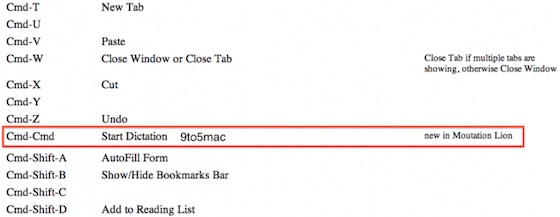
9to5Mac reports that a keyboard shortcut listing the latest build of OS X Mountain Lion Suggests that built-in dictation capabilities will be coming to the Mac as well. Such capabilities debuted as part of Siri on the iPhone 4S, with only dictation portion making its way into the third-generation iPad released earlier this year.
"According to a resources file inside of the latest build of Safari in the newest seed of the upcoming OS X Mountain Lion, Dictation might be making its way to Macs next. Since Macs do not sport virtual keyboards or physical keyboards with a microphone-labled key, users (by default) will apparently need to simultaneously click both command keys to start voice input."


At the moment there is no other evidence of dictation or other Siri-like features yet. Or they have not been discovered in OS X Mountain Lion yet. But Apple is continuing to work on the next generation operating system and will probably be previewed at next month's Worldwide Developers Conference (WWDC) in San Francisco. 

OS X Mountain Lion Adding Offline Safari Reading List Mode and Dictation to Mac

Well, since Apple's last developer update of OS X Mountain Lion, several new features including hints of automatic app downloads were discovered in the next-generation operating system. It looks like the discoveries are still continuing to grow with two new features: Offline Reading List Mode and iOS-like dictation.

Gear Live highlighted that offline reading list option, which can be argued as the Safari bookmarking feature, but that's not the point. The point is is that it syncs saved articles across all devices, like iPhoto. Gear Live also noticed that a warning screen in Safari on OS X Mountain Lion indicated that articles saved to Reading List are still readable even when the user's Mac is not connected to the Internet. Which in my opinion is pretty neat!
"While troubleshooting a home network issue today, I stumbled upon a new feature that Apple is introducing in OS X Mountain Lion.
When you aren't connected to a network and pull up Safari, you get a message that tells you that you aren't connected to the Internet, but that your "Reading List articles are available for viewing while you are offline."

9to5Mac reports that a keyboard shortcut listing the latest build of OS X Mountain Lion Suggests that built-in dictation capabilities will be coming to the Mac as well. Such capabilities debuted as part of Siri on the iPhone 4S, with only dictation portion making its way into the third-generation iPad released earlier this year.
"According to a resources file inside of the latest build of Safari in the newest seed of the upcoming OS X Mountain Lion, Dictation might be making its way to Macs next. Since Macs do not sport virtual keyboards or physical keyboards with a microphone-labled key, users (by default) will apparently need to simultaneously click both command keys to start voice input."


At the moment there is no other evidence of dictation or other Siri-like features yet. Or they have not been discovered in OS X Mountain Lion yet. But Apple is continuing to work on the next generation operating system and will probably be previewed at next month's Worldwide Developers Conference (WWDC) in San Francisco. 


In the new version of OS X Mountain Lion Developer Preview 3, Apple has enabled an iOS feature called "Automatic App Downloads" in the App Store. Like on the iPhone and iPad, when you buy an app one of your Macs, all of your other Macs logged on to the same App Store account will automatically install the app too. It's kinda like 'Photo Stream'... Just without the photos.

9to5mac reported that at this point in-time, the feature does not seem to be working completely.

"While the App Store will still offer to enable automatic downloads, it does not actually install anything when you purchase apps from another computer. However, it does apparently show the app as being installed when you view it in the App Store."

There is a good chance that Apple will fix this issue in the next developer preview or they may even update this developer preview.

Latest Mountain Lion update brings iOS-like automatic downloads for apps


In the new version of OS X Mountain Lion Developer Preview 3, Apple has enabled an iOS feature called "Automatic App Downloads" in the App Store. Like on the iPhone and iPad, when you buy an app one of your Macs, all of your other Macs logged on to the same App Store account will automatically install the app too. It's kinda like 'Photo Stream'... Just without the photos.

9to5mac reported that at this point in-time, the feature does not seem to be working completely.

"While the App Store will still offer to enable automatic downloads, it does not actually install anything when you purchase apps from another computer. However, it does apparently show the app as being installed when you view it in the App Store."

There is a good chance that Apple will fix this issue in the next developer preview or they may even update this developer preview.


Apple pushed out another update to its OS X 10.8 Mountain Lion developer preview program, moving to build 12A206J.


Apple notes that "MacBookPro3,1", which corresponds to mid and late 2007 machines, is not compatible with the new build because of an issue that was reflected in a later build of the OS.
No other details on improvements in latest build are available yet, but certainly appears that Apple is making some of its final tweaks for developers leading up to its WWDC, which is less that four weeks away. Apple is also expected to provide previews of OS X Mountain Lion at the conference and with a public launch scheduled for "late summer".

Apple Updates OS X Mountain Lion Developer Preview to Build 12A206j


Apple pushed out another update to its OS X 10.8 Mountain Lion developer preview program, moving to build 12A206J.


Apple notes that "MacBookPro3,1", which corresponds to mid and late 2007 machines, is not compatible with the new build because of an issue that was reflected in a later build of the OS.
No other details on improvements in latest build are available yet, but certainly appears that Apple is making some of its final tweaks for developers leading up to its WWDC, which is less that four weeks away. Apple is also expected to provide previews of OS X Mountain Lion at the conference and with a public launch scheduled for "late summer".


Mac developers can get their hands on the 3rd release of Mountain Lion developer preview, build 12A178q. It comes with a list of fixes and minor tweaks. The release notes also list the known issues that are still being worked on by Apple which are issues with both Quicktime and Game Center. There are also directions for developers to submit bug reports as they explore the new Mountain Lion build.

OS X 10.8 Mountain Lion is expected to be launched to the public sometime this summer, just one year after the release of OS X Lion, making it Apple's fasest major OS update so far and the fastest turnaround on fixes than ever before.

ISSUES THAT APPLE HAVE REPORTED:

- On systems with FileVault enabled, cancelling the restart to the Mountain Lion Developer Preview 3 Installer may leave your system unable to present a password dialog at boot time. You can repair the problem by holding down command-R to boot to the Recovery OS and then using Disk Utility to unlock and Repair your volume. 
- Installing OS X 10.8 over 10.7.2 or earlier with FileVault turned on may fail 
- Pre-Lion FileVault user accounts are not supported in this Developer Preview 
- Some Apple menu items such as Restart may not work when a sandboxed app is in the foreground 
- iTunes no longer syncs Notes 
- Mail's photo browser cannot access the iPhoto library 
- Back to My Mac doesn't work for the first 5 minutes after rebooting 
- DVD Player may not launch after inserting a DVD on some systems 
- Most help topics are unavailable in this Developer Preview 
- In the Recovery HD: 
     - Some icons may be missing 
     - Network Utility's Lookup pane does not work 
     - Time Machine restoration via a AFP share does not work 
     - Restoring from a Time Machine backup via AFP does not work 
- Migration from a Time Machine backup that excludes paths such as /System may yield an unusable system 
- Brightness settings may change unexpectedly after reboot 
- Display brightness may be dim after sleep or reboot 
- If Mail is hidden at logout time, it may not be correctly relaunched during a subsequent login but will appear to be running 
- Java applets may not work in Safari 
- QuickTime screen recordings may produce corrupted videos or cause an exception when run on machines with NVDIA graphics

Third Developer Preview For OS X Mountain Lion Is Released!

Mac developers can get their hands on the 3rd release of Mountain Lion developer preview, build 12A178q. It comes with a list of fixes and minor tweaks. The release notes also list the known issues that are still being worked on by Apple which are issues with both Quicktime and Game Center. There are also directions for developers to submit bug reports as they explore the new Mountain Lion build.

OS X 10.8 Mountain Lion is expected to be launched to the public sometime this summer, just one year after the release of OS X Lion, making it Apple's fasest major OS update so far and the fastest turnaround on fixes than ever before.

ISSUES THAT APPLE HAVE REPORTED:

- On systems with FileVault enabled, cancelling the restart to the Mountain Lion Developer Preview 3 Installer may leave your system unable to present a password dialog at boot time. You can repair the problem by holding down command-R to boot to the Recovery OS and then using Disk Utility to unlock and Repair your volume. 
- Installing OS X 10.8 over 10.7.2 or earlier with FileVault turned on may fail 
- Pre-Lion FileVault user accounts are not supported in this Developer Preview 
- Some Apple menu items such as Restart may not work when a sandboxed app is in the foreground 
- iTunes no longer syncs Notes 
- Mail's photo browser cannot access the iPhoto library 
- Back to My Mac doesn't work for the first 5 minutes after rebooting 
- DVD Player may not launch after inserting a DVD on some systems 
- Most help topics are unavailable in this Developer Preview 
- In the Recovery HD: 
     - Some icons may be missing 
     - Network Utility's Lookup pane does not work 
     - Time Machine restoration via a AFP share does not work 
     - Restoring from a Time Machine backup via AFP does not work 
- Migration from a Time Machine backup that excludes paths such as /System may yield an unusable system 
- Brightness settings may change unexpectedly after reboot 
- Display brightness may be dim after sleep or reboot 
- If Mail is hidden at logout time, it may not be correctly relaunched during a subsequent login but will appear to be running 
- Java applets may not work in Safari 
- QuickTime screen recordings may produce corrupted videos or cause an exception when run on machines with NVDIA graphics

Popular Posts