background img

The New Stuff

Showing posts with label iPad. Show all posts
Apple today released the third beta of iOS 7, which brings a number of improvements and bug fixes to the operating system. According to the release notes, double notifications have been resolved and AirPlay issues have also been fixed. 

Several other minor enhancements have been bundled into the release, as noted by our forum members: 

Redesigned Fonts - Fonts across a number of apps appear to have been tweaked to be thicker, using Helvetica Neue Regular instead of Ultra Light. This is most noticeable in the Messages app, where text appears to be bolded, but it can also be seen in the Weather app, the Notification Center, and the Settings menu. Panic co-founder @cabel hasprovided a GIF that demonstrates the differences. 
notificationcenter
Safari - Safari has had the .com button removed and replaced with a simple period button. The .com, .net, and .org domain extensions can be accessed by holding down on the button. 

Status Bar - The Status Bar, which provides information on cellular connection strength, Wi-Fi, Bluetooth, and battery life has had its size slightly increased for better readability on the lock screen. 
thickerfonts
Lock Screen - When playing music, the lock screen will now display the time. 
lockscreentime
Music App - The Music app has seen a slight redesign with new icons and rearranged controls. Ratings have also been re-added. 

Podcasts - Apple's Podcasts app is now functional. 

Calendar - In the monthly view, the Calendar app has been updated to display small gray dots on days where events are scheduled. 
calendar
Siri - A number of MacRumors forum members have noted that Siri’s voice now sounds more natural. 

New App Download Animation - When installing an app, iOS 7 users will see a new animation that does away with download bars in favor of a more organic circular download timer. 
newdownloadanimation
Control Center - The clock located in the Control Center has seen yet another redesign, this time appearing in the original dark format that was removed during beta 2 in favor of a thinly outlined version. 
controlcenterclock
Additional features in iOS 7 beta 3 will be added here as they are discovered. Apple is likely to continue pushing regular updates for iOS 7, bringing minor performance boosts and changes ahead of the operating system's public release, which is expected to come in the fall.

iOS 7 Beta 3 Tidbits: New App Download Animation, Thicker Fonts, Safari Improvements

Apple today released the third beta of iOS 7, which brings a number of improvements and bug fixes to the operating system. According to the release notes, double notifications have been resolved and AirPlay issues have also been fixed. 

Several other minor enhancements have been bundled into the release, as noted by our forum members: 

Redesigned Fonts - Fonts across a number of apps appear to have been tweaked to be thicker, using Helvetica Neue Regular instead of Ultra Light. This is most noticeable in the Messages app, where text appears to be bolded, but it can also be seen in the Weather app, the Notification Center, and the Settings menu. Panic co-founder @cabel hasprovided a GIF that demonstrates the differences. 
notificationcenter
Safari - Safari has had the .com button removed and replaced with a simple period button. The .com, .net, and .org domain extensions can be accessed by holding down on the button. 

Status Bar - The Status Bar, which provides information on cellular connection strength, Wi-Fi, Bluetooth, and battery life has had its size slightly increased for better readability on the lock screen. 
thickerfonts
Lock Screen - When playing music, the lock screen will now display the time. 
lockscreentime
Music App - The Music app has seen a slight redesign with new icons and rearranged controls. Ratings have also been re-added. 

Podcasts - Apple's Podcasts app is now functional. 

Calendar - In the monthly view, the Calendar app has been updated to display small gray dots on days where events are scheduled. 
calendar
Siri - A number of MacRumors forum members have noted that Siri’s voice now sounds more natural. 

New App Download Animation - When installing an app, iOS 7 users will see a new animation that does away with download bars in favor of a more organic circular download timer. 
newdownloadanimation
Control Center - The clock located in the Control Center has seen yet another redesign, this time appearing in the original dark format that was removed during beta 2 in favor of a thinly outlined version. 
controlcenterclock
Additional features in iOS 7 beta 3 will be added here as they are discovered. Apple is likely to continue pushing regular updates for iOS 7, bringing minor performance boosts and changes ahead of the operating system's public release, which is expected to come in the fall.

There has been recent reports about a redesigned 'Flatter user interface in iOS 7, 9to5Mac says the next version of the operating system will lose "all signs of gloss, shine and skeuomorphism".

Jony Ive took charge of all Apple's user interface teams last October following a management shakeup.

"While the look of the updated system may be surprising to some, iOS 7 is reportedly not more difficult to use than earlier versions of software platform. There is apparently no new learning curve in the same way there was no learning curve when the iPods went color. While iOS 7 does look different, its core apps and system fundamentals (like the Lock and Home screens) mostly operate in a similar fashion to how they do today.

iOS 7 is codenamed “Innsbruck,” according to three people familiar with the OS. The interface changes include an all-new icon set for Apple’s native apps in addition to newly designed tool bars, tab bars, and other fundamental interface features across the system.
9to5Mac also said that Apple's engineers are looking to add more at-a-glance information to ios, while keeping the system easy to use for less tech-savvy customers. The article notes that Apple has looked at ideas to implement new pa
nels with swipes from the left and the right of the screen, much like how the Notification Center currently drops from above.

Apple's industrial design is the face of the company for many customers and with Ive heading up both the software and hardware teams, there could be a closer connection between the devices themselves and what users actually see on the screen going forward.

Jony Ive's 'Very, Very Flat' Design for iOS 7

There has been recent reports about a redesigned 'Flatter user interface in iOS 7, 9to5Mac says the next version of the operating system will lose "all signs of gloss, shine and skeuomorphism".

Jony Ive took charge of all Apple's user interface teams last October following a management shakeup.

"While the look of the updated system may be surprising to some, iOS 7 is reportedly not more difficult to use than earlier versions of software platform. There is apparently no new learning curve in the same way there was no learning curve when the iPods went color. While iOS 7 does look different, its core apps and system fundamentals (like the Lock and Home screens) mostly operate in a similar fashion to how they do today.

iOS 7 is codenamed “Innsbruck,” according to three people familiar with the OS. The interface changes include an all-new icon set for Apple’s native apps in addition to newly designed tool bars, tab bars, and other fundamental interface features across the system.
9to5Mac also said that Apple's engineers are looking to add more at-a-glance information to ios, while keeping the system easy to use for less tech-savvy customers. The article notes that Apple has looked at ideas to implement new pa
nels with swipes from the left and the right of the screen, much like how the Notification Center currently drops from above.

Apple's industrial design is the face of the company for many customers and with Ive heading up both the software and hardware teams, there could be a closer connection between the devices themselves and what users actually see on the screen going forward.

The first iPad only newspaper is shutting down on the 15th of December. The shutdown doesn't come with much of a surprise because last year the news paper was put 'on watch' ad an option to help News Corp. As part of a major restructuring initiative some of The Daily's staff have moved over to the New York Post, but it is not clear on how many staff will be taking the transition. In a statement The Daily's creator and News Corp. founder Rupert Murdoch said that "our experience was that we could not find a large enough audience quickly enough to convince us the business model was sustainable in the long-term."

There's no word yet on whether annual subscribers will receive any partial refunds for their $39.99 annual subscriptions, but the app is still available for purchase in the iTunes Store.

'The daily' is shutting down

The first iPad only newspaper is shutting down on the 15th of December. The shutdown doesn't come with much of a surprise because last year the news paper was put 'on watch' ad an option to help News Corp. As part of a major restructuring initiative some of The Daily's staff have moved over to the New York Post, but it is not clear on how many staff will be taking the transition. In a statement The Daily's creator and News Corp. founder Rupert Murdoch said that "our experience was that we could not find a large enough audience quickly enough to convince us the business model was sustainable in the long-term."

There's no word yet on whether annual subscribers will receive any partial refunds for their $39.99 annual subscriptions, but the app is still available for purchase in the iTunes Store.


Apple today has released the second beta of iOS 6.1 to developers. The beta has the build number of 10B5105c, versus 10B5095f for the first beta of iOS 6.1.

As with the first beta, Apple mentions a number of changes from iOS 6.0.1, including several related to how developers can integrate Apple's new mapping service in their apps, as well as improvemnent to how boarding passes are handled in Passbook, and a few minor changes to Safari.

Apple also released a beta of the Apple TV software, as well as Xcode 4.6 Developer Preview 2. Registered developers can download the betas via Apple's developer page.

Apple Seeds Second iOS 6.1 Beta to Developers

Apple today has released the second beta of iOS 6.1 to developers. The beta has the build number of 10B5105c, versus 10B5095f for the first beta of iOS 6.1.

As with the first beta, Apple mentions a number of changes from iOS 6.0.1, including several related to how developers can integrate Apple's new mapping service in their apps, as well as improvemnent to how boarding passes are handled in Passbook, and a few minor changes to Safari.

Apple also released a beta of the Apple TV software, as well as Xcode 4.6 Developer Preview 2. Registered developers can download the betas via Apple's developer page.

Lets start off by saying that this is the result of a wonderful partnership between Rovio Entertainment and Lucasfilm. Although it's one of several licensed video games on smartphones and tablets (Disney's Where's My Perry?), it is by far the most important, but because this is one of the few examples where unique elements from a big-time franchise like Star Wars enhanced an already proven formula.


This game is pretty much the same Angry Birds IP with a Star Wars skin. The familaiar red bird, arguably the mascot from the entire Angry Birds series, does a fine Luke Skywalker impression, complete with blonde hair and Tatooine fatigues. Yellow bird, meanwhile, is bound to melt some hearts as the galaxy's most darling scoundrel, Han Solo, destined to fall in love with the pink bird, as you all know Princess Leia. Even C-3PO, R2-D2 and Obi-Wan Kenobi are present and accounted for, while the evil Empire falls under the grip of the Dark Lord of the Pigs, Darth Vader, and his loyal Pigtroooper Army. Yes, they take up residence in the Pig Star.

This game is more than just window-dressing. Propel Luke Skywalker via slingshot and tap the creen, then watch as the Jedi-to-be unleashes a spinning lightsaber slash the cuts through most objects in his path (which is just awesome to watch). Han Solo, on the other hand, fires three shots from his blaster that not only pierce through creates and glass, but also ricochet off metal surfaces.

So should you get this game? Well yeah! If you love Angry Birds and Star Wars, then you will love this game!

Angry Birds Star Wars! Should You Get It? Yes! [Review]

Lets start off by saying that this is the result of a wonderful partnership between Rovio Entertainment and Lucasfilm. Although it's one of several licensed video games on smartphones and tablets (Disney's Where's My Perry?), it is by far the most important, but because this is one of the few examples where unique elements from a big-time franchise like Star Wars enhanced an already proven formula.


This game is pretty much the same Angry Birds IP with a Star Wars skin. The familaiar red bird, arguably the mascot from the entire Angry Birds series, does a fine Luke Skywalker impression, complete with blonde hair and Tatooine fatigues. Yellow bird, meanwhile, is bound to melt some hearts as the galaxy's most darling scoundrel, Han Solo, destined to fall in love with the pink bird, as you all know Princess Leia. Even C-3PO, R2-D2 and Obi-Wan Kenobi are present and accounted for, while the evil Empire falls under the grip of the Dark Lord of the Pigs, Darth Vader, and his loyal Pigtroooper Army. Yes, they take up residence in the Pig Star.

This game is more than just window-dressing. Propel Luke Skywalker via slingshot and tap the creen, then watch as the Jedi-to-be unleashes a spinning lightsaber slash the cuts through most objects in his path (which is just awesome to watch). Han Solo, on the other hand, fires three shots from his blaster that not only pierce through creates and glass, but also ricochet off metal surfaces.

So should you get this game? Well yeah! If you love Angry Birds and Star Wars, then you will love this game!

After weeks of hints and teasers, Rovio has finally released Angry Birds Star Wars. The game is exactly what you would expect, but with a Star Wars theme.

"In fact it's drenched with Star Wars stuff. Every level, bird, and most of the game's mechanics, both old or new, are covered in a thick layer of Star Wars.

Red bird, for example, resembles Luke and has a secondary lightsaber attack that shears through hard surfaces and pigs. The blue bird is now a rebel pilot, able to fire spread shots from its pistol. Levels are set in classic Star Wars backdrops and every time the game introduces a "new" bird, you'll see a classic Star Wars scene starring the birds."


Angry Birds Star Wars is available on iPhone ($0.99), iPad ($2.99), and on the Mac ($4.99)

Angry Birds Star Wars is now available on iPhone, iPad and Mac

After weeks of hints and teasers, Rovio has finally released Angry Birds Star Wars. The game is exactly what you would expect, but with a Star Wars theme.

"In fact it's drenched with Star Wars stuff. Every level, bird, and most of the game's mechanics, both old or new, are covered in a thick layer of Star Wars.

Red bird, for example, resembles Luke and has a secondary lightsaber attack that shears through hard surfaces and pigs. The blue bird is now a rebel pilot, able to fire spread shots from its pistol. Levels are set in classic Star Wars backdrops and every time the game introduces a "new" bird, you'll see a classic Star Wars scene starring the birds."


Angry Birds Star Wars is available on iPhone ($0.99), iPad ($2.99), and on the Mac ($4.99)

It looks like iOS 6.1 is on its way with the first beta arriving to developers. The update is expected to arrive sometime after the holidays with Xcode 4.6 preview for developers to tinker with. The codename for the build is "Build 10B5095f" which has been seen on Apple's official site. 

New tools for making Maps

The most notable new tool is a class called "MKLocalSearch" for the Map Kit framework. It lets programs "search for map-based addresses and points of interest." It lets developers enter placename information and portions of address and have search returns that match the info and provide additional data. 


Example

An example given by Apple was if a user searched for "coffee," the new tool would generate returns with the location of local coffeeshops and provide extra info on each java joint. 

iOS 6.0.1

The release of iOS 6.0.1 which fixed many important bugs that needed to be addressed.
Those hoping that Apple Maps would be fixed during the incremental update should continue to hold their breath. Many users have been upset with the inaccurate and missing data in the navigation app Apple launched during iOS 6 to replace Google Maps

Apple releases iOS 6.1 beta to developers

It looks like iOS 6.1 is on its way with the first beta arriving to developers. The update is expected to arrive sometime after the holidays with Xcode 4.6 preview for developers to tinker with. The codename for the build is "Build 10B5095f" which has been seen on Apple's official site. 

New tools for making Maps

The most notable new tool is a class called "MKLocalSearch" for the Map Kit framework. It lets programs "search for map-based addresses and points of interest." It lets developers enter placename information and portions of address and have search returns that match the info and provide additional data. 


Example

An example given by Apple was if a user searched for "coffee," the new tool would generate returns with the location of local coffeeshops and provide extra info on each java joint. 

iOS 6.0.1

The release of iOS 6.0.1 which fixed many important bugs that needed to be addressed.
Those hoping that Apple Maps would be fixed during the incremental update should continue to hold their breath. Many users have been upset with the inaccurate and missing data in the navigation app Apple launched during iOS 6 to replace Google Maps

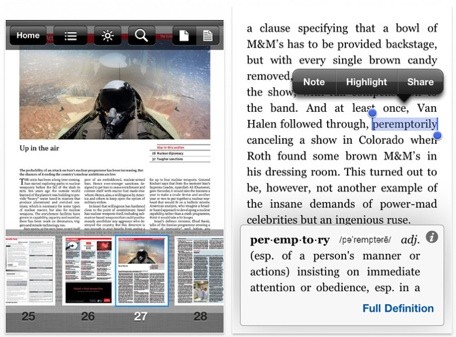
Amazon has pushed out an update today for its iOS app that'll make it even easier to read all of your favourite books on your iPad or iPhone. The latest update brings rapid highlighting to all devices and adjustable margins to the iPad. The latter feature offers three different layouts, so that you can pick the best style suits you.


Students heading back to school will appreciate the new features for pint replica textbooks. Navigating through a textbook is easy thanks to the addition of page thumbnails and back and forward buttons. Students can also now highlight, as well as bookmark and notes, will be stored in a new notebook feature. Students can tag and filter the notebook so they can easily find and review items for their upcoming exams.

The Kindle app is available for free from the iOS App Store.

Kindle for iOS update adds adjustable margins and more

Amazon has pushed out an update today for its iOS app that'll make it even easier to read all of your favourite books on your iPad or iPhone. The latest update brings rapid highlighting to all devices and adjustable margins to the iPad. The latter feature offers three different layouts, so that you can pick the best style suits you.


Students heading back to school will appreciate the new features for pint replica textbooks. Navigating through a textbook is easy thanks to the addition of page thumbnails and back and forward buttons. Students can also now highlight, as well as bookmark and notes, will be stored in a new notebook feature. Students can tag and filter the notebook so they can easily find and review items for their upcoming exams.

The Kindle app is available for free from the iOS App Store.

A Facebook employee named Jonathan Dann has written a blog post detailing how the company's iOS engineering team designed earlier Facebook for iPhone apps and the coding that was required to rewrite the new Facebook 5.0 app.

Developers will love and others will be interested in how one of the most popular iPhone apps gets made, so its definitely worth the read.

Here's an excerpt:
One of the biggest advantages we've gained from building on native iOS has been the ability to make the app fast. Now, when you scroll through your news feed on the new Facebook for iOS, you'll notice that it feels much faster than before. One way we have achieved this is by re-balancing where we perform certain tasks. For example, in iOS, the main thread drives the UI and handles touch events, so the more work we do on the main thread, the slower the app feels. Instead, we take care to perform computationally expensive tasks in the background. This means all our networking activity, JSON parsing, NSManagedObject creation, and saving to disk never touches the main thread.

To give another example, we use Core Text to lay out many of our strings, but layout calculations can quickly become a bottleneck. With our new iOS app, when we download new content, we asynchronously calculate the sizes for all these strings, cache our CTFramesetters (which can be expensive to create), and then use all these calculations later when we present the story into our UITableView.

Finally, when you start Facebook for iOS, you want to see your news feed, not a loading spinner. To provide the best experience possible, we now show previously-cached content immediately. But this introduces a new problem: If you have a lot of stories in your news feed, UITableView throws a small spanner in the works by calling the delegate method -tableView:heightForRowAtIndexPath: for each story in your news feed in order to work out how tall to make its scrollbar. This would result in the app loading all the story data from disk and calculating the entire story layout solely to return the height of the story, meaning startup would get progressively slower as you accumulate more stories.

The solution to this particular problem has two main parts. Firstly, when we do our initial asynchronous layout calculations, we also store the height of the story in Core Data. In doing so, we completely avoid layout calculation in -tableView:heightForRowAtIndexPath:. Secondly, we've split up our "story" model object. We only fetch the story heights (and a few other things) from disk on startup. Later, we fetch the rest of the story data, and any more layout calculations we have to do are all performed asynchronously.

Engineers Detail Major Efforts to Rewrite Facebook iOS App

A Facebook employee named Jonathan Dann has written a blog post detailing how the company's iOS engineering team designed earlier Facebook for iPhone apps and the coding that was required to rewrite the new Facebook 5.0 app.

Developers will love and others will be interested in how one of the most popular iPhone apps gets made, so its definitely worth the read.

Here's an excerpt:
One of the biggest advantages we've gained from building on native iOS has been the ability to make the app fast. Now, when you scroll through your news feed on the new Facebook for iOS, you'll notice that it feels much faster than before. One way we have achieved this is by re-balancing where we perform certain tasks. For example, in iOS, the main thread drives the UI and handles touch events, so the more work we do on the main thread, the slower the app feels. Instead, we take care to perform computationally expensive tasks in the background. This means all our networking activity, JSON parsing, NSManagedObject creation, and saving to disk never touches the main thread.

To give another example, we use Core Text to lay out many of our strings, but layout calculations can quickly become a bottleneck. With our new iOS app, when we download new content, we asynchronously calculate the sizes for all these strings, cache our CTFramesetters (which can be expensive to create), and then use all these calculations later when we present the story into our UITableView.

Finally, when you start Facebook for iOS, you want to see your news feed, not a loading spinner. To provide the best experience possible, we now show previously-cached content immediately. But this introduces a new problem: If you have a lot of stories in your news feed, UITableView throws a small spanner in the works by calling the delegate method -tableView:heightForRowAtIndexPath: for each story in your news feed in order to work out how tall to make its scrollbar. This would result in the app loading all the story data from disk and calculating the entire story layout solely to return the height of the story, meaning startup would get progressively slower as you accumulate more stories.

The solution to this particular problem has two main parts. Firstly, when we do our initial asynchronous layout calculations, we also store the height of the story in Core Data. In doing so, we completely avoid layout calculation in -tableView:heightForRowAtIndexPath:. Secondly, we've split up our "story" model object. We only fetch the story heights (and a few other things) from disk on startup. Later, we fetch the rest of the story data, and any more layout calculations we have to do are all performed asynchronously.

Today Angry Birds Space has been updated with an awesome new episode tied to NASA's Curiosity Mars Rover. NASA and Rovio have partnered extensively on marketing for Angry Birds Space, using the game to promote NASA's educational scientific discoveries.


The new update sees the piggies hijacking the Curiosity Mars Rover and introducing 20 new levels on Mars for the Angry Birds.

NASA is helping pigs and birds explore the Martian terrain and shed light on the agency's missions to the Red Planet in the latest update to the game Angry Birds Space. Rovio Entertainment, creator of Angry Birds, announced the update Thursday, complete with a cast of agency rovers and landers. 

Earlier this year, millions of gamers were introduced to concepts of microgravity in Angry Birds Space, which was supported through a partnership with NASA and includes links to a variety of education information. 

"Rovio is teaching huge new audiences about NASA's missions to Mars thanks to this collaboration," said David Weaver, associate administrator for communications at NASA Headquarters in Washington. "It's a great way to introduce both kids and adults to the wonders of the planet in a fun and entertaining way."

Angry Birds Space is available on the iPhone, iPad and the Mac

Angry Birds Space Updated With Curiosity Mars Rover Content

Today Angry Birds Space has been updated with an awesome new episode tied to NASA's Curiosity Mars Rover. NASA and Rovio have partnered extensively on marketing for Angry Birds Space, using the game to promote NASA's educational scientific discoveries.


The new update sees the piggies hijacking the Curiosity Mars Rover and introducing 20 new levels on Mars for the Angry Birds.

NASA is helping pigs and birds explore the Martian terrain and shed light on the agency's missions to the Red Planet in the latest update to the game Angry Birds Space. Rovio Entertainment, creator of Angry Birds, announced the update Thursday, complete with a cast of agency rovers and landers. 

Earlier this year, millions of gamers were introduced to concepts of microgravity in Angry Birds Space, which was supported through a partnership with NASA and includes links to a variety of education information. 

"Rovio is teaching huge new audiences about NASA's missions to Mars thanks to this collaboration," said David Weaver, associate administrator for communications at NASA Headquarters in Washington. "It's a great way to introduce both kids and adults to the wonders of the planet in a fun and entertaining way."

Angry Birds Space is available on the iPhone, iPad and the Mac

The engineers behing the iOS version of Minecraft has submitted an update for version 0.4.0 of the app, and as you can see from the changelog, they're adding some really important and exciting features to the game. Chests is probably the biggest update: those can built with materials found in the world and allow players to store more of what they find and collect out there. Beds are also being added in to the game, which will help players more easily survive the creepy and dangerous nights.


Minecraft's most popular monster, the Creeper, is also headed to the mobile version of the game in the next update. These zombified guys sneak up on players from behind and explode when close, not just hurting players, but destroying structures built nearby.

The update sounds really good and the differences between the iOS version and the PC version are shrinking more and more every time an update like this arrives. The development teams says that the patch has been submitted to Apple already, and should be out sometime next month.

Want Minecraft for iOS? [Direct link]

Minecraft iOS getting chests, creepers, beds and more

The engineers behing the iOS version of Minecraft has submitted an update for version 0.4.0 of the app, and as you can see from the changelog, they're adding some really important and exciting features to the game. Chests is probably the biggest update: those can built with materials found in the world and allow players to store more of what they find and collect out there. Beds are also being added in to the game, which will help players more easily survive the creepy and dangerous nights.


Minecraft's most popular monster, the Creeper, is also headed to the mobile version of the game in the next update. These zombified guys sneak up on players from behind and explode when close, not just hurting players, but destroying structures built nearby.

The update sounds really good and the differences between the iOS version and the PC version are shrinking more and more every time an update like this arrives. The development teams says that the patch has been submitted to Apple already, and should be out sometime next month.

Want Minecraft for iOS? [Direct link]

So mostly everyone has heard about a rumour of an "iPad mini" and the rumour has been circulating for quite some time now, with a number of reports indicating that Apple is planning to launch the device with a 7.85-inch display later this year. While rumours have been evolving over time, things have now been beginning to firm up a bit with a report last month from iMore, which has offered accurate information on several topics in recent months.
Image courtesy of MacRumors

Unwired has reported that [Google translation] from Chinese site MyDrivers.com claiming that Apple will indeed be launching a 7.85-inch iPad later this year. According to the report's anonymous supply chain sources, the iPad mini will be carrying mostly the same thickness as the iPad 2, with Apple using Sharp's indium gallium zinc oxid (IGZO) technology to create a thinner and brighter display.

IGZO was rumoured to be in Apple's third-generation iPad, but apparaently Apple were not ready in time, as Sharp did not begin to mass produce the panels until mid-april.

A few days ago, a chinese website called Apple Daily reported (via DigiTimes) that Apple will be refreshing the current iPad this summer with new IGZO displays. But with even DigiTime calling the claim a "highly doubtful" one, those waiting for such a display will most probably be disappointed.

Apple Planning for 7.85-Inch 'iPad Mini' with IGZO Display Later This Year?

So mostly everyone has heard about a rumour of an "iPad mini" and the rumour has been circulating for quite some time now, with a number of reports indicating that Apple is planning to launch the device with a 7.85-inch display later this year. While rumours have been evolving over time, things have now been beginning to firm up a bit with a report last month from iMore, which has offered accurate information on several topics in recent months.
Image courtesy of MacRumors

Unwired has reported that [Google translation] from Chinese site MyDrivers.com claiming that Apple will indeed be launching a 7.85-inch iPad later this year. According to the report's anonymous supply chain sources, the iPad mini will be carrying mostly the same thickness as the iPad 2, with Apple using Sharp's indium gallium zinc oxid (IGZO) technology to create a thinner and brighter display.

IGZO was rumoured to be in Apple's third-generation iPad, but apparaently Apple were not ready in time, as Sharp did not begin to mass produce the panels until mid-april.

A few days ago, a chinese website called Apple Daily reported (via DigiTimes) that Apple will be refreshing the current iPad this summer with new IGZO displays. But with even DigiTime calling the claim a "highly doubtful" one, those waiting for such a display will most probably be disappointed.

The South Carolina accessory maker 'Twelve south has revamped its popular BookBook case for the iPad. As you can see, the look of the case doesn't look really all that much different compared to their last BookBook, but Engadget has reported that Twelve South has done some reworking.


Twelve South has posted a blog post going over everything that has changed, including the new Classic Black colour. BookBook for iPad is available for $79.99 from Twelve South's website and Apple Retail Stores. 

Twelve South Revamps BookBook for iPad

The South Carolina accessory maker 'Twelve south has revamped its popular BookBook case for the iPad. As you can see, the look of the case doesn't look really all that much different compared to their last BookBook, but Engadget has reported that Twelve South has done some reworking.


Twelve South has posted a blog post going over everything that has changed, including the new Classic Black colour. BookBook for iPad is available for $79.99 from Twelve South's website and Apple Retail Stores. 


Apple has just released another Television ad for the new iPad called "Do It All". The Retina Display is the focus with the new ad, with a number of different apps sharing the spotlight.

"Send a note. Stay informed.

Catch a show. Make your point.

Make a memory. Make a masterpiece.

Read something. Watch something. And learn something.

Do it all more beautifully, with the Retina display, on iPad."

This is the second ad that Apple has released for the new iPad. Apple has also released an ad for the new Retina display MacBook Pro.

Apple's New iPad TV Ad "Do It All'


Apple has just released another Television ad for the new iPad called "Do It All". The Retina Display is the focus with the new ad, with a number of different apps sharing the spotlight.

"Send a note. Stay informed.

Catch a show. Make your point.

Make a memory. Make a masterpiece.

Read something. Watch something. And learn something.

Do it all more beautifully, with the Retina display, on iPad."

This is the second ad that Apple has released for the new iPad. Apple has also released an ad for the new Retina display MacBook Pro.


There are quite a few third-party browsers for Apple's iPad. Mozilla Firefox Junior aims to "re-think the bwoser user experience from the ground-up.


In the video above, Alex Limi and Trond werner Lansen preset Firefox Junior, a prototype version of the Firefox on the iPad which wants to reinvent the way you navigate on the web.

So at the moment, Mozilla does demo the browser as allowing the user to view webpages in full, uninterrupted fullscreen mode, with only just two buttons on view so that the user can navigate their web experience. The buttons are the 'Back' button and the 'Plus' button for "going somewhere new."

Firefox Junior For iPad


There are quite a few third-party browsers for Apple's iPad. Mozilla Firefox Junior aims to "re-think the bwoser user experience from the ground-up.


In the video above, Alex Limi and Trond werner Lansen preset Firefox Junior, a prototype version of the Firefox on the iPad which wants to reinvent the way you navigate on the web.

So at the moment, Mozilla does demo the browser as allowing the user to view webpages in full, uninterrupted fullscreen mode, with only just two buttons on view so that the user can navigate their web experience. The buttons are the 'Back' button and the 'Plus' button for "going somewhere new."


So this is the new iPad case. It looks relatively similar to the old iPad 2 cases doesn't it? Instead, with the new Smart Case, it provides an extra layer of protection so that you can keep your iPad in great shape! 


"The iPad Smart Case covers your iPad – both front and back – yet still retains the thin, light design of iPad. Like the Smart Cover, it folds easily into a stand for reading, typing, and watching video. And it automatically wakes and sleeps iPad on open and close. Made from polyurethane, [...] you can personalize it with free laser engraving on the Apple Online Store."
Apple's new Smart Cover is available with six different colours and starts at $49.


The New iPad Smart Case


So this is the new iPad case. It looks relatively similar to the old iPad 2 cases doesn't it? Instead, with the new Smart Case, it provides an extra layer of protection so that you can keep your iPad in great shape! 


"The iPad Smart Case covers your iPad – both front and back – yet still retains the thin, light design of iPad. Like the Smart Cover, it folds easily into a stand for reading, typing, and watching video. And it automatically wakes and sleeps iPad on open and close. Made from polyurethane, [...] you can personalize it with free laser engraving on the Apple Online Store."
Apple's new Smart Cover is available with six different colours and starts at $49.


Apple today introduced a new Maps application in iOS 6 that will replace Google Maps as the default mapping application on the iPhone and iPad. It was designed by Apple from the ground up with all cartography done in-house. 


Included in Maps are turn-by-turn directions that work with Siri, local search with 100 million business listings from around the world, Yelp integration, and 3D mapping with 'Flyover'. 


Maps wil ship with iOS later this fall

Sources: WWDC and Mac Rumours


Apple Launches New 'Maps' App in iOS 6, Includes Turn-by-Turn Navigation, Real-Time Traffic, 3D Maps

Apple today introduced a new Maps application in iOS 6 that will replace Google Maps as the default mapping application on the iPhone and iPad. It was designed by Apple from the ground up with all cartography done in-house. 


Included in Maps are turn-by-turn directions that work with Siri, local search with 100 million business listings from around the world, Yelp integration, and 3D mapping with 'Flyover'. 


Maps wil ship with iOS later this fall

Sources: WWDC and Mac Rumours


Google today has just announced that they have acquired Quickoffice. Quickoffice was originally founded in 2002 and known for its productivity suite for iPhone and iPad.

Googles move was a smart one. Google Docs is quite good on the desktop, but many people still are not impressed with how Google Docs has been handled on the iPad. The desktop version of Google Docs made its way to the iPad in 2010, and many people say that the performance was disappointing.

It will be an interesting ride to see what Google does with the App. It would be awesome if the app will become an official Google Docs app, and dropping the app cost.

Google Acquires Quickoffice

Google today has just announced that they have acquired Quickoffice. Quickoffice was originally founded in 2002 and known for its productivity suite for iPhone and iPad.

Googles move was a smart one. Google Docs is quite good on the desktop, but many people still are not impressed with how Google Docs has been handled on the iPad. The desktop version of Google Docs made its way to the iPad in 2010, and many people say that the performance was disappointing.

It will be an interesting ride to see what Google does with the App. It would be awesome if the app will become an official Google Docs app, and dropping the app cost.


A prototype of the first-generation iPad has sold on eBay for over $10,200 - around £6,500. That's quite a lot to pay of an iPad that is in typical eBay Style, "fully functional apart from the touchscreen which may or may not be able to fixed". A touchscreen-less iPad doesn't sound so exiting but the buyer has a very rare tablet. The iPad tester unit also comes with two dock connectors. One where you'd expect to find it - just beneath the home button. And another one on the long-side -presumably Apple was mulling landscape docking but decided against it.

The iPad also comes with SwitchBoard, Apple's software testing suite which the company disabled but the eBay seller has refurbished it as far as possible.

Dual-dock iPad Prototype Sells for $10,200


A prototype of the first-generation iPad has sold on eBay for over $10,200 - around £6,500. That's quite a lot to pay of an iPad that is in typical eBay Style, "fully functional apart from the touchscreen which may or may not be able to fixed". A touchscreen-less iPad doesn't sound so exiting but the buyer has a very rare tablet. The iPad tester unit also comes with two dock connectors. One where you'd expect to find it - just beneath the home button. And another one on the long-side -presumably Apple was mulling landscape docking but decided against it.

The iPad also comes with SwitchBoard, Apple's software testing suite which the company disabled but the eBay seller has refurbished it as far as possible.

Yahoo has launched a new search software which offeres results as a swipeable string of webpage previews rather than a list of links.

The service is being released as a an app for Apple's iPads and iPhones, and also a plug-in for all web browsers.

This new app may help Yahoo fightback from is declining popularity of its search tools. Adverts are not included in the results which means that Yahoo will not be making money off this app.

Also in the app:
  • A list of trending search topics when the service is activated.
  •  The ability to deduce which page previews are wanted and display them before the full query has been typed in. (Like Google Chromes Url bar)
  • Different devices can share bookmarks, partly-completed searches and customised home page.
  • Social sharing options have also been added, Twitter, Interest and email.  Surprisingly no Facebook or Google+.

Yahoo's special products management director Ethan Batraski Blogged:
"By supercharging the browser with a visually rich experience and seamlessly connecting that experience across all of your device, we are delivering an experience that will change the game"
He also added:
"We decided to remove all the noise so you can focus on what you really want."
The app at the moment is only available in the US, but will become available to France, the UK, and other markets by the end of the year.
 

Yahoo Launches Visual Search App

Yahoo has launched a new search software which offeres results as a swipeable string of webpage previews rather than a list of links.

The service is being released as a an app for Apple's iPads and iPhones, and also a plug-in for all web browsers.

This new app may help Yahoo fightback from is declining popularity of its search tools. Adverts are not included in the results which means that Yahoo will not be making money off this app.

Also in the app:
  • A list of trending search topics when the service is activated.
  •  The ability to deduce which page previews are wanted and display them before the full query has been typed in. (Like Google Chromes Url bar)
  • Different devices can share bookmarks, partly-completed searches and customised home page.
  • Social sharing options have also been added, Twitter, Interest and email.  Surprisingly no Facebook or Google+.

Yahoo's special products management director Ethan Batraski Blogged:
"By supercharging the browser with a visually rich experience and seamlessly connecting that experience across all of your device, we are delivering an experience that will change the game"
He also added:
"We decided to remove all the noise so you can focus on what you really want."
The app at the moment is only available in the US, but will become available to France, the UK, and other markets by the end of the year.
 

Popular Posts